· Security · 4 min read
Android App Permissions Explained: What Are You Really Giving Access To?
Stop blindly tapping 'Allow.' Understand exactly what Android permissions are, which ones are dangerous, and how to manage them for your privacy.
You’ve done it. We’ve all done it. A new app asks for access to your contacts, camera, and location. You tap ‘Allow’ without a second thought, just to get it working.
But what did you actually agree to?
This is the central question in understanding your device’s security. Having your android app permissions explained isn’t just for tech experts—it’s a critical step for anyone who values their privacy.
What Are Android App Permissions?
Think of your phone as a secure house. Your photos, contacts, and messages are all in locked rooms. An app permission is a key you give to an app, allowing it to enter a specific room.
A photo editor needs the ‘Storage’ key to access your gallery. A map app needs the ‘Location’ key. This system is designed to protect you, but it only works if you are the one in charge of the keys.
”Normal” vs. “Dangerous” Permissions
Android divides permissions into different levels. Most are “normal” permissions that pose little risk—things like accessing the internet (which virtually every app needs) or changing your wallpaper.
“Dangerous” permissions are different. These are the keys to your private rooms. When an app requests one of these, Android stops and asks you for explicit approval.
Common Dangerous Permissions to Watch
- Location: Does a simple notepad app really need to know where you are 24/7? This can be used for GPS tracking or targeted advertising.
- Camera / Microphone: The most sensitive. Only grant this to apps you actively use for photos, video, or calls. An app with this permission could theoretically record you at any time.
- Contacts: Granting this lets an app read, and sometimes modify, your entire address book. This data is often harvested and sold.
- Storage (Read/Write): This gives an app access to all files on your phone—photos, documents, downloads.
- Phone / SMS: This allows an app to make calls and read or send text messages on your behalf. This is a massive red flag for any non-communication app.
- Accessibility: This is the master key. It can read your screen, intercept your typing, and perform actions on your behalf. Be extremely cautious with this permission.
Why Context is Everything
A permission itself isn’t “bad.” The context is what matters.
A video chat app asking for your Camera and Microphone is logical. A simple calculator app asking for the same permissions is a major red flag.
Before granting access, always ask one simple question: “Does this app need this permission to do its core job?”
If the answer is no, deny it. If the app refuses to work without it, consider finding an alternative.
How to Take Back Control: Managing Your Permissions
You don’t have to live with your past choices. You can—and should—review the permissions you’ve already granted.
1. Review Permissions on Install
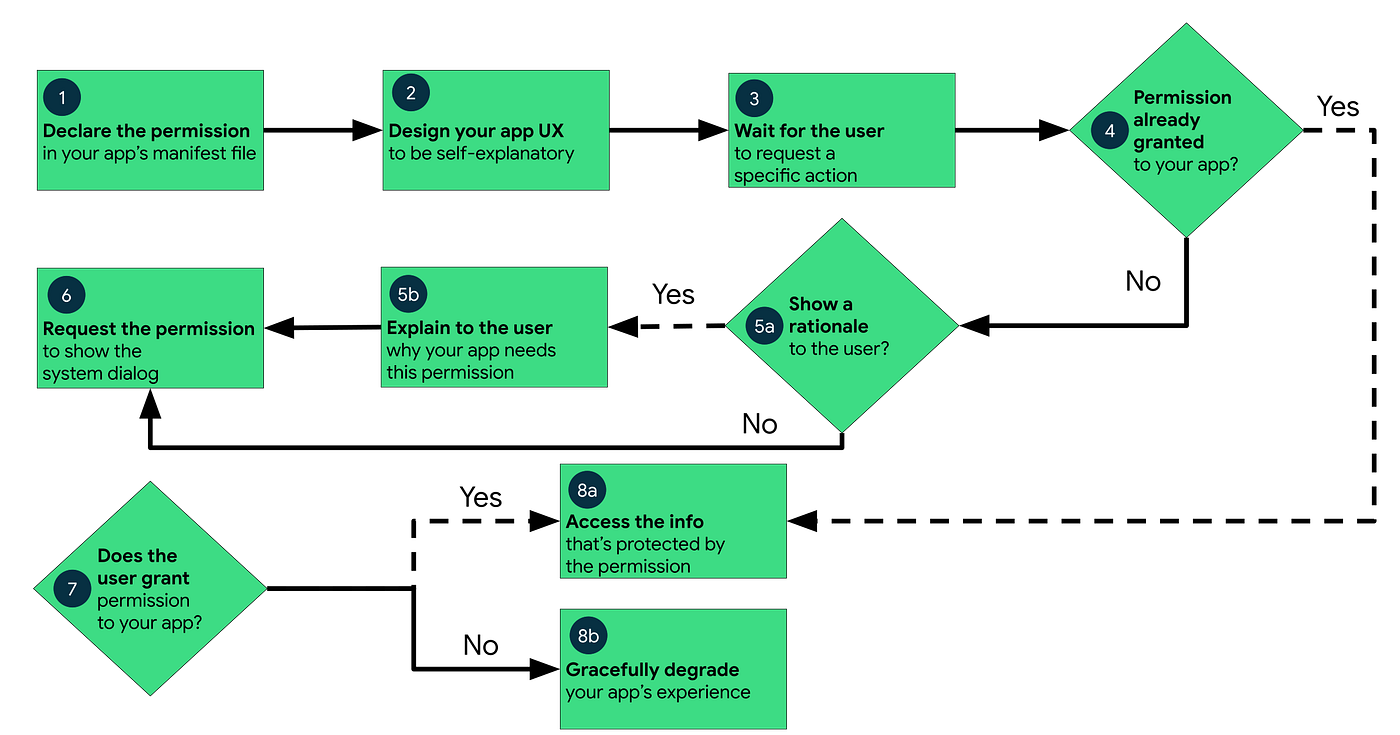
Modern Android versions ask for permissions as the app needs them (e.g., when you first try to take a photo). Don’t just tap ‘Allow’ from muscle memory. Think. Choose ‘While using the app’ whenever possible, and ‘Deny’ if it seems suspicious.
2. Audit Your Existing Apps
- Go to Settings > Apps > See all apps.
- Select an app you want to check.
- Tap on Permissions.
- Here, you can see what’s allowed and what’s denied. Change them as you see fit.
3. Use the Permission Manager
This is the fastest way to see which apps have access to a specific permission.
- Go to Settings > Security & privacy > Privacy.
- Tap on Permission manager.
- From here, you can click ‘Location’ or ‘Contacts’ and see every app that has access. It’s the best way to find and revoke access from apps that don’t need it.
You Are the Gatekeeper
Understanding app permissions isn’t about being paranoid; it’s about being smart. Your data is valuable.
By paying attention to what you’re allowing, you move from being a passive user to an informed owner of your device. Every ‘Allow’ or ‘Deny’ is a choice—make it a conscious one.